Apr 4, 2015

EMC ViPR - SRM - Overview

1. Introduction
The EMC ViPR SRM solution enables you to identify and manage the impact that storage resources have on the performance and availability of your applications. You can assure storage services through end-to-end analysis—from the application to the host and down to the storage array. With improved insight, your storage resources will be optimized, resulting in better cost control even while data grows at record rates.
The ViPR SRM provides you with real-time updates through dynamic reporting of all resources and performance dependencies. Furthermore, you can analyze application performance through trending and threshold notifications correlated with storage metrics. You’ll gain a better understanding of interdependencies through visualization of all physical and virtual relationships—from the application to the host and from the host through the storage—to improve efficiencies and optimize resources
§  To summarize, EMC ViPR SRM Solution enables you to:
§  Visualize:
         View relationships and topologies from application to storage system
         Correlate application health with Storage KPI's
§  Analyze:
         Create custom reports and dashboards
         Define and report storage utilization by Service Level in multivendor environment
         Validate configuration compliance
§  Optimize:
         Storage workloads based on the optimal tiering strategy
         Identify application capacity usage for primary storage and replicas
         Improve productivity while on the road through mobile access


2. Architecture

The ViPR SRM provides increased visibility into heterogeneous storage environments. Its tight integration with EMC storage systems enables customers to monitor and analyze their use of key EMC differentiating technologies such as Fully Automated Storage Tiering for Virtual Pools (FAST VP) and Federated Tiered Storage to meet both application performance and cost containment objectives.
This new release of EMC ViPR SRM combines the functionality of the three products, ProSphere, Storage Configuration Advisor and Watch4net, into one product with a single architecture. While most customers welcome the agentless discovery of the suite, some customers requested the option to deploy agents. So now customers have a choice, agentless or agent discovery. Health, threshold-based and configuration alerts have been consolidated into a single report by severity as well as presented into a dashboard for at-a-glance assessment of alerts by severity, device type and category. We’ve also added a vApp-based deployment option in addition to the native OS install shield.

With the 3.1 release, the ViPR SRM now has a single front-end portal and console, single database and single discovery/collection engine. ViPR SRM provides a fully integrated solution of the individual components that composed SRM Suite 2.0 (Watch4net, ProSphere and Storage Configuration Advisor). The Suite enables a centralized view of a distributed storage environment. It is focused on providing a view into what resources are in use, how they are connected and if there are availability, performance or capacity issues in the environment. It enables visualization, performance troubleshooting, capacity reporting and configuration analysis.


3. Application to Infrastructure Mapping


ViPR SRM provides end to end analysis that allows storage teams to understand and visualize host to storage relationships and dependencies. There are several topology view available: physical, logical masked and logical masked with replicas. With these insights, you can analyze performance and availability trends along the data path and how they may be impacting application service levels


This is an example of a custom dashboard that can easily be created to show the host, VMware, SAN switch, host file system, storage and chargeback for an application or business unit.  ViPR SRM will also show end-to-end views for environments that contain AIX-VIO, VPLEX, and IBM SVC 

Application to infrastructure mapping extends beyond EMC VMAX, VNX, VNXe3200 and XtremIO arrays with topology views and path details reports for select multivendor arrays such as Hitachi Data Systems, IBM XIV, IBM SVC, HP StorageWorks P9000, HP 3PAR and NetApp


4. Performance Trending and Reporting


When performance issues occur, the Storage Administrator needs to identify or eliminate components within the storage infrastructure as the cause of the problem.  Identifying the relationship dependencies along the data path is extremely difficult, which only becomes more complicated in highly virtualized environments.
ViPR SRM offers detailed relationship views from the host to the LUN with PowerPath metrics to analyze performance bottlenecks.  This enables the Storage Administrator to perform end to end analysis from the host to the switch to the array, identify performance issues along the data path for traditional and software-defined storage.  It also includes centralized PowerPath configuration, metrics and alerts for all PowerPath hosts to enhance performance troubleshooting.
Automating key processes of identifying end-to-end relationships, bottlenecks, and contributors to those bottlenecks reduces the time it takes to troubleshoot performance issues from hours and weeks to minutes and hours greatly improves Storage Administrators productivity 

ViPR SRM provides detailed end-to-end topology views for your storage environment. It allows you to analyze performance from a virtual or physical host, <CR> Hypervisor, <CR> switch, <CR> VPLEX and <CR> array perspective.  This end-to-end visibility enables storage administrators to quickly isolate performance problems across the data path. With ViPR SRM, you gain a visual understanding of the complex relationships that exist in VPLEX environments with the ability to quickly drill down and analyze performance anywhere along the data path to improve service levels and increase productivity

You can analyze and report on performance trends for EMC and third-party storage with ViPR SRM. This is an example report showing NetApp Filer LUNs and Volume performance, Network and CPU performance.  (Note: A complete list of all supported arrays, switches, hosts and applications is available later in this deck.)

Understanding network usage by object storage
Organizations are increasingly adopting object storage to support the development of mobile and web scale applications. These applications demand high performance and drive the growth of unstructured data.  Understanding demands placed on network capacity by  rapidly growing object storage environments is essential to ensuring consistent service levels while supporting planning processes.
ViPR SRM automates reporting of network usage for EMC object storage
ViPR SRM automates reporting of network usage over time providing visibility into the total number of objects and data uploaded and downloaded as well as visibility into objects read, objects written, data downloaded, and data uploaded by project and service-level.

Automated analysis improves network capacity planning to ensure SLA’s
With ViPR SRM’s automated reporting, storage administrators gain insight into network utilization to improve capacity planning processes. It also provides insight into data downloaded and uploaded by project and service-level to align the cost of storage services with workload requirements.

5. Storage and Application Capacity Trending and Reporting


ViPR SRM’s reporting extends across data centers sites and heterogeneous storage environments. It also has tight integration with EMC arrays so you can define service levels based on FAST policy, VMAX3 Service Level Objective (SLO), array model, or RAID type.  It enables you to track the true cost of supporting an application by allowing you to group hosts by application or department and discover all capacity consumed by all primary volumes and replicas supporting those hosts 

Capacity planning is probably one of the most challenging and daunting tasks you as Storage Administrators have to do.  You often struggle to understand capacity consumption across different vendors and models of storage.  Capacity management is often a manual time consuming effort. With limited visibility to capacity usage and trends, planning for and justifying new purchases is extremely difficult.


ViPR SRM provides storage teams with enterprise level storage capacity dashboards, which includes EMC ECS, VMAX, DMX, VNX, VNXe3200, CLARiiON, Celerra, VPLEX, XtremIO as well as multivendor storage from HDS, HP P9000, HP 3PAR, IBM XIV and NetApp, enabling them to understand how much capacity they have and how much is being used. Capacity utilization trends help identify when more capacity will be needed. 
Better visibility into capacity utilization allows storage teams to more efficiently manage that capacity which translates into more efficient use of capital.  Automated report generation eliminates tedious manual effort by storage teams, freeing them up to work on revenue generating projects.  Furthermore with better insights to capacity utilization, they are now better armed to justify new purchases.


6.Application Usage Chargeback


Storage Administrators need to ensure they are providing show back or chargeback to application owners for all the storage that supports the application. Capacity management is manual and error prone, making it very time consuming and difficult to calculate the true cost of storage. Without this visibility they cannot communicate the true cost of storage services to application owners.
In this example, how would you charge for application storage?
Local copies for backup should be charged to application owner, not backup, despite mapping.
Local copy for development servers should probably be charged to application as well
Remote copy should also be charged to the application since it will be used in the event of an outage to recover the application remotely.

ViPR SRM provides chargeback reports which map storage to service levels based on array characteristics or FAST policies. It has the ability to track the consumption of capacity over time and identify the application that is utilizing all the storage assets including primary storage, snapshots as well as local and remote copies. This data is collected and can be used in the formulation of a true chargeback report to the line of business. Total chargeback for the application storage should include all this capacity.

Storage teams can provide application owners with chargeback reports, enabling them to communicate the true value of storage services. Automating these chargeback reports streamlines the reporting process to application owners and improves the productivity of the storage team.


Experience has shown that over half of SAN problems are due to configuration issues. For most organizations, managing compliance with defined design best practices and the support matrix guidelines is a manual and time-consuming process. Non-compliance with defined policies can cause SLA violations which can take hours/days to resolve. In some cases, penalties are paid for SLA violations. ViPR SRM monitors compliance your design best practices and the EMC Support Matrix to ensure your environment is properly configured to meet service level requirements. Because configuration changes are tracked, you can investigate changes that have been done over time to determine what change may have caused an issue and eliminate hours of troubleshooting processes to improve productivity


Storage Administrators struggle to communicate the value and delivery of storage services to a variety of users and roles.  Reporting is typically manual and extremely time consuming.  ViPR SRM offers a flexible reporting engine to create a wide variety of reports from the extremely simple to highly customized.  Reports can be created and scheduled to run on a regular basis allowing them to be easily shared or Emailed to key stakeholders such as application owners, lines of business or tenants in the case of service providers.  
Automating reports for key stakeholders saves storage teams significant time and eliminates manual errors.  With better reporting capabilities they are able to communicate the value and performance of their storage services. These are two examples of custom dashboards and reports that were created as part of a sales campaign for a service provider in EMEA.  The top dashboard was created for the storage team who needs to view storage utilization across the platinum, gold, silver and bronze storage tiers for all customers.  The bottom dashboard highlights the multi-tenant capability, which only allows tenants to view their storage tiers


EMC ViPR - Software Defined Storage - Architecture

1. Introducing EMC ViPR
EMC ViPR provides a central point of access to all management functions, translating requests into specific calls to the underlying storage, while offering storage services to multiple users or tenants, with different access roles through a single common portal. This approach standardizes operations, reduces complexities, and improves an organizations efficiency and agility in deliver storage when and where needed. It offers universal APIs to facilitate rapid application development and integration with the existing storage management point solutions. ViPR enables RainPole for the first time to manage heterogeneous storage environments, including third party arrays and commodity storage like Amazon S3 or even DropBox. RainPole developers are also able to build an API interface to any standard storage to be managed by ViPR.
But what makes EMC Software-Defined Storage unique, is that unlike previous attempts at storage virtualization, ViPR decouples the control path from the data path. By abstracting the control path, storage management operates at the virtual layer, which gives customers the ability to partition a storage pool into virtual storage arrays. This is analogous to partitioning a server into a number of virtual machines. Control path data services provide multitenancy, service cataloging, metering and monitoring across all arrays. Unlike previous attempts at storage virtualization, EMC ViPR does not sit in the data path for file and block stores. This ensures applications can access storage and all its underlying value and data services embedded in the storage arrays. It also enables administrators to centralize data provisioning and data management tasks, and allow any applications to access file and block data.
To summarize, ViPR enables RainPole to deliver:
  •  Heterogeneous storage array management
  •  Policy based management of storage pools abstracted from hardware
  •  Leverage the capabilities of the underlying hardware platforms
  •  Centralized Storage network management with Unified storage views across the Data Center
  •  New interface support
ViPR Software-Defined Storage
EMC ViPR provides a central point of access to all management functions, translating requests into specific calls to the underlying storage, while offering storage services to multiple users or tenants, with different access roles through a single common portal. This approach standardizes operations, reduces complexities, and improves an organizations efficiency and agility in deliver storage when and where needed. It offers universal APIs to facilitate rapid application development and integration with the existing storage management point solutions.
ViPR enables RainPole – for the first time – to manage heterogeneous storage environments, including third party arrays and commodity storage like Amazon S3 or even DropBox. RainPole developers are also able to build an API interface to any standard storage to be managed by ViPR.
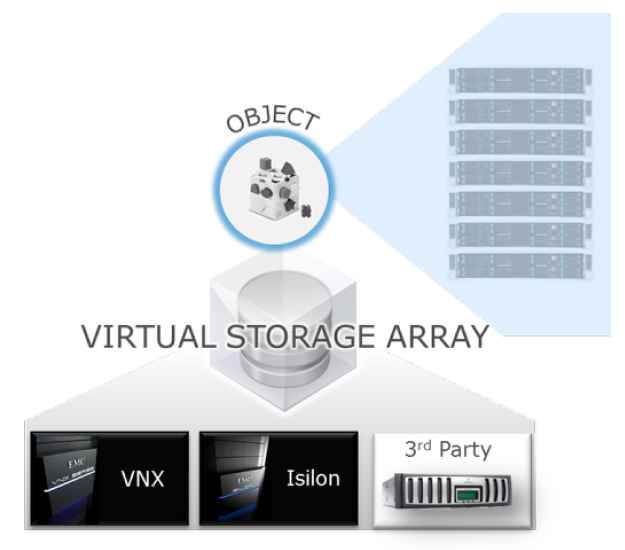
But what makes EMC Software-Defined Storage unique, is that unlike previous attempts at storage virtualization, ViPR decouples the control path from the data path. By abstracting the control path, storage management operates at the virtual layer, which gives customers the ability to partition a storage pool into virtual storage arrays.
This is analogous to partitioning a server into a number of virtual machines. Control path data services provide multitenancy, service cataloging, metering and monitoring across all arrays. Unlike previous attempts at storage virtualization, EMC ViPR does not sit in the data path for file and block stores. This ensures applications can access storage and all its underlying value and data services embedded in the storage arrays. It also enables administrators to centralize data provisioning and data management tasks, and allow any applications to access file and block data.


ViPR Storage Asset Discovery
ViPR discovers the arrays and all their corresponding storage pools and ports. Once the Fibre Channel switches are added, ViPR automatically discovers and maps the Fibre Channel networks. And ViPR can accomplish this virtualization and mapping for EMC and non-EMC arrays, including EMC VMAX, EMC VNX, EMC Isilon, EMC VPLEX, EMC Atmos and NetApp. And ViPR will support additional EMC and commodity disks in addition to publishing the APIs.
 
ViPR Abstraction layer
ViPR hides the complexity of all the underlying storage arrays and exposes their core functionality as data services while retaining the unique attributes of the arrays. Storage administrators then create Virtual Storage Pools in ViPR that represent sets of capabilities required by unique application workloads. For example, a transactional workload would be best served by a Virtual Storage Pool that features the characteristics of high-performance block storage such as EMC VMAX. A cloud application such as online file and content sharing is not performance-sensitive and would work just fine on commodity hardware that more economically provides the requisite level of data protection and availability. In either case, a user subscribes to a Virtual Storage Pool that meets their workload’s demands.


2. ViPR Controller
ViPR controller:
  •  Discovers and registers all ViPR-supported arrays
  •  Abstracts physical storage into a virtual pool where storage services such as provisioning, metering, cataloging, and delivery can be automated
  •  Delivers storage through a self-service catalog, and
  •  Centralizes management across the virtual storage environment
  •  Virtualizes your physical storage and configures your virtual storage arrays,
  •  Automates storage tasks and centralizes management across physical and virtual environments
  •  Discovering and registering arrays is the first of 3 easy steps to virtualize, automate, and centralize storage.
Through an easy-to-use portal, the storage administrator defines the storage environment that it wants ViPR to manage. They point to storage arrays, SAN switches, and data protection devices. ViPR then discovers and abstracts physical storage arrays with all their unique capabilities into a single pool of virtual storage. This is a very simple process as you will learn in this lab. The storage administrator simply points to the array and ViPR discovers the rest. This step only needs to be done at the beginning, when ViPR is first deployed, or at anytime the administrator wants to add or change the configuration.


ViPR Controller Architecture
  •  Distributed as virtual appliance (software-only package)
  •  Load balancer service evenly distributes workloads across VMs and maximize throughput
  •  Workflow automator and controller services that execute workflow steps on storage infrastructure
  •  Coordinator service coordinates tasks between distributed processes ViPR
ViPR Software Architecture
ViPR makes a multi-vendor storage environment look like one, big virtual array. ViPR uses software adapters that connect to the underlying arrays, similarly to how device drivers enable universal device compatibility with a PC. ViPR  exposes the APIs so any vendor, partner or customer can build new adapters to add new arrays. This creates an extensible “plug and play” storage environment that can automatically connect to, discover and map arrays, hosts and SAN fabrics


3. ViPR Data Services
With the separation of the physical from the logical (data plane from the control plane) many new capabilities are possible for providing cloud-scale data operations over traditional storage and for enabling partners and customers to extend and customize the ViPR platform.
ViPR Data Services are cloud-scale storage services implemented in software and layered over traditional storage - ViPR-managed arrays. ViPR Data Services are hardware agnostic. It unlocks storage and data services from vendorspecific arrays, and extends them across heterogeneous storage.
The ViPR object data service is similar to Amazon S3 model


ViPR Data Services Architecture
The ViPR object data service features a scale-out node-based architecture with full failover between nodes. Data nodes handle all object requests and are virtualized to facilitate easy deployment.
Providing object and HDFS as data services enables new uses for legacy applications and data and supporting nextgeneration applications and workflows without heavy infrastructure lifting.
Object-on-file preserves investments in existing software and workflows while adding new object capabilities. Hadoop supports new use cases where there is no legacy solution


4. Docs


EMC Atmos - Fundamentals

1. What is Atmos
Traditional SAN and NAS storage solutions are much too expensive and cannot handle the demands and requirements of this new category of data. Features such as global distribution, policy-based data management, massive scale, and low management cost are ‘must have’ requirements. EMC Atmos cloud storage delivers these features and provides support for multi-tenant secure virtualized resource isolation and allocation. Atmos does this by leveraging off-the-shelf hardware, and combines it with a rich set of software features to provide an innovative and cost effective solution to store, secure, distribute, and manage traditional and new categories of data. Atmos is a new type of data storage and management framework that addresses a current void in the market. Atmos:
  • Is based on a unique set of data services with no limits on namespace or location.
  • Can be accessed using web or file-based services and provides automated protection and efficiency services to manage data.
  • Can be implemented on an EMC-developed, exabyte-scale object store using physical or virtual appliances which address the challenges of storing and managing vast amounts of unstructured content for custom or packaged applications.
A multi-location Atmos system can be managed as a single autonomous resource and can be delivered as a self-service experience to consumers


The Atmos solution is comprised of commodity-based servers connected to standard 15 slot disk enclosures. Today the disk enclosures are being populated with one or multi terabyte SATA drives and up to four DAEs can be attached to each front-end node.
The number of nodes provisioned in an Atmos rack can vary depending on budget and performance requirements. Each rack includes a 24-port gigabit Ethernet switch to provide inter-node communication. Generation 3 hardware uses the same high level architecture but uses blade servers and high density DAE’s to improve capacity within the Atmos footprint.


The terminology used to describe a group of nodes installed in an Atmos rack connected by a gigabit Ethernet switch is an installation segment (IS). Very often large implementations have multiple ISs installed. They are defined as an RMG (Resource Management Group). The RMG most often refers to a site or location so it is possible to have a single IS as an RMG. This would be the case for a particular site with a single rack Atmos system.


The new Generation 3 Atmos hardware reflects a move to higher density storage capacity with lower power consumption within the same physical footprint. The new Gen 3 dense 480 is built around the Intel Phoenix blade server which provides four servers in a 2U chassis which essentially doubles the density of the previous server configuration.
The other major change is the 60-drive Voyager high density DAE which increases capacity within the Atmos footprint and simplifies the dual-stack 15-drive DAE configuration used in previous releases. It is expected that the straight forward cable configuration will improve reliability and decrease repair and upgrade time while moving toward a more standard hardware configuration.
Hardware configurations support fully populated 60-drive DAE’s or partially populated DAE’s of 15 or 30 drives with the ability to increase drives and expand capacity as needed.


Atmos Generation 3 uses the Intel Phoenix blade server. This model offers performance upgrades over Generation 2 servers within a smaller form factor. Internal disks can be accessed from the front while each server blade can be inserted or removed from the back. All video, LAN, and SAS connectivity is provided directly on the back of the equipment from each server card. Each chassis is equipped with redundant power supplies.

Allied Telesis has been the preferred switch vendor for many EMC products including Atmos. Since Atmos was introduced, Allied Telesis switches were used to provide internal inter-nodal connectivity and external connectivity to customer and access networks.
With the introduction of Generation 3 hardware, an optional 24-port switch from Arista Networks was made available for compatibility with 10 GbE customer networks. In later Generation 3 deployments, the Arista model 7048 switch will be the standard device used to provide connectivity between nodes displacing the popular Allied Telesis model


The 4U, 60-drive Voyager DAE includes up to 60, 3.5-inch disk drives. It supports 6 Gb/s data transfer speeds and provides redundant fan modules, two Link Control Cards (LCCs), two Inter Connect Modules (ICMs), and two power supplies. All of these functional modules are monitored by the Atmos system and all status, failures, and malfunctions are reported through the Atmos GUI. Recent updates allow for deployments of partially populated DAEs to accommodate different capacity configurations and the ability to expand as demand increases.

2. Atmos Features and Capabilities
The secret of creating an efficient content cloud is the underlying software. Atmos can be implemented on an EMC specific hardware platform or on industry standard VM servers. In either case, the Atmos solution provides massively scalable infrastructure supporting multiple petabytes of storage and billions of objects across multiple sites that can be globally distributed.
Storing, protecting, and distributing information are core functions of the Atmos system. The ability to efficiently manage the resources that support the environment is also important. It is conceivable that a traditional NAS solution could be implemented to store mass amounts of distributed unstructured data. What would the expense of such an implementation be? The cost of managing a NAS increases with the scale of the solution—quickly making it cost prohibitive.
Because Atmos is object based, stored data is abstracted from the physical storage which means traditional tasks of sizing, allocating, and managing the storage resource is greatly simplified. This is only half of the management story. In typical multi-user distributed environments, there is no provision for classifying stored information which means all data is treated equally. This scheme severely limits the solution provider from offering differentiated services.
Atmos uses a sophisticated policy management system that applies intelligence to every object stored. Policy definitions can easily be created to tell the system where to put the content and which actions to take. Additionally, object based metadata allows you to trigger policy for virtually any scenario including system, application, and user defined metadata.
Policies also support a comprehensive set of data services that allow you to perform operations such as replication, versioning, and retention. This means that distribution, protection, availability, performance, and disk efficiency can be considered for all objects and data types.

The philosophy and design of Atmos cloud storage is to provide the most comprehensive and innovative feature set in a single package without the need for additional licensing. The specific features and operational characteristics of Atmos are designed to meet the requirements of the newest demands and classifications of data produced today. Functionality is classified into six different groups:

  • Scalability
  • Policy-based Control
  • Operational Efficiency
  • Accessibility
  • Security
  • Self-management


Use Cases:
  • Web Facing Applications – Atmos is the perfect global content store for digital images or rich content to Web 2.0 applications. It is low cost and provides distribution capabilities to locate data close to the consumer.
  • Unstructured Content Storage (Cloud Drive) – Atmos provides a wide array of access options and has direct plug-in capability to many new sync and share as well as cloud drive applications providing ready access to data anytime, anywhere.
  • Backup Target – The low cost and policy features of Atmos make it a strong candidate for backup-to-disk applications.
  • Archive/Retention – Atmos provides a rich set of features and operational characteristics that make it a strong candidate for archive data. Low acquisition cost, low touch monitoring and maintenance, full replica, GeoParity, green drive, and auto delete features allow administrators to transition data to the precise amount of resource over the lifetime of the content.
  • Content Distribution – You can leverage Atmos policy and your own data center locations to distribute content based on your needs, service levels, and consumption requirements.
  • Service Provider (IaaS) – Atmos is the ideal infrastructure for storage as a service. Implemented on the Atmos Cloud Delivery Platform (ACDP), service providers can set up self service and resource monitoring to support auto provisioning and chargeback applications.
Flexible Storage Access
  • Atmos provides flexible access to storage via its client service. The service runs on all Atmos nodes and has interfaces to accommodate access methods that fall into two basic categories: web-based access and file-based access.
  • An object can be accessed via either web-based or file-based methods. Regardless of the access method, all objects are defined using a global, unique identifier – the object ID. Applications using the web service interface can interact with objects via this identifier directly. File-based access to objects uses traditional namespace paths and filenames with Atmos performing the translation to the object ID transparently.
  • Cross platform web clients connect to Atmos web services over HTTP. The web service interface allows direct access to the object API over the Representational State Transfer (REST) protocol. The Atmos web services interface allows customers to quickly integrate Atmos with existing applications that, like Atmos, have a service-oriented architecture. Web service access must be explicitly enabled on each Atmos server where desired.
  • For file-based access, the Common Internet File System (CIFS) and the Network File System (NFS) services are supported. However CIFS and NFS cannot coexist on any single Atmos server. The CIFS and NFS access methods need to be kept separate on a per server basis. The CIFS service must be explicitly enabled on each Atmos server where desired.
  • Installable File System (IFS) access is provided through the network for clients running Red Hat Enterprise Linux release 5 (RHEL5). The client must load a file system userspace ‘Fuse’ package and install the EMC provided IFS bundle. The client will then have access to the Atmos clustered file system. By default, IFS is enabled on all Atmos servers.
Atmos Core Service
  • Client Service (CS): Interface for clients to access storage. Communicates with SS, MDS, RMS, and MDLS services. 
  • Metadata Location Service (MDLS): A distributed index that maps object IDs to the MDSs responsible for those objects. The purpose of MDLS is to determine an MDS that will handle a data request. 
  • Metadata Service (MDS): Where metadata (as opposed to user data) is stored and managed. The MDS manages access to object metadata and the file system namespace. Policy Manager (PM): (part of the MDS) It stores policies and selects appropriate policies for objects and reconciles abstract policies into concrete layout descriptions. Resource Manager Service (RMS): Tracks the location and monitors the status and properties of service instances in the system in a distributed manner. It probes the network to find out what machines are on the network, what services are running on those machines, and what properties those services have. Properties vary according to the service. SS properties include storage available, unused storage, location, and features. 
  • Storage Service (SS): Manages a set of disks on which user data is stored. The core service distribution is as follows: MDLS: Is located on the first two nodes installed (within the first install segment). 
  • The first node installed in all other subsequent RMGs also runs MDLS. All other core services (CS, MDS,PM, RMS, and SS): On all nodes (install segments in all RMGs).


How Atmos work


  • The application sends the file over an IP-based network to an Atmos which is mounted or mapped as any drive resource. Anytime you send a file to Atmos, it generates a unique identifier for this “object” using a hashing algorithm and other environment variables. The algorithm is calculated against the contents of the file to derive a value unique to that file.
  • The result of this calculation is stored in Atmos as part of the object metadata and is used anytime you want to read or access the file. At some point, an acknowledgement will be sent back to the application signaling that the data is secured on Atmos.
  • Note that the configuration of the Atmos policy plays a major role as to when the acknowledgment gets returned. If the policy dictates asynchronous replication, the acknowledgment will be sent after the first replica or copy of the data is written. If synchronous replicas are specified in the policy, all copies must be written before the acknowledgment is returned.
  • During the write process, file metadata is processed by the policy system to determine how and where the data objects will be stored in the Atmos system. An object ID in Atmos looks like a random alphanumeric string but is the mechanism used by the system to track and locate stored data. If a user wants to recall the object, they simply use the original path and filename to do so. The client services front-end of Atmos acts as a proxy presenting standard web and file interfaces while obscuring the back-end object storage.


3. Atmos Managemtn Overview
Atmos provides various types of notifications and reports that help you maintain and if needed, troubleshoot your Atmos system. Atmos provides the following types of notifications:
  • Alerts are created when situations result in errors and warnings, or to provide information. Sources may come from either hardware or software.
  • Email notifications can be sent based on severity, which will trigger the email alerts. Each RMG has its own email alert configuration.
  • SNMP – both SNMP trap generation and SNMP standard (MIB-II) MIB access are supported. For MIB access, the SNMP agent must be configured. 
Atmos also provides log collection and system reports, which are used by EMC Technical Support when troubleshooting:
  • Log collection collects logs for debugging purposes. After the logs are collected, you can save the log package and send them to EMC Technical Support.
  • System report collects data about your Atmos configuration and sends a report to the EMC System Reports database, through the System Report (SYR) mechanism. System reports are sent to the EMC System Reports Database to improve customer service, and allow EMC to provide timely support for Atmos issues.

 4. Docs

EMC Atmos - Archirecture

EMC Atmos is a cloud storage platform that enables enterprises and service providers to store, manage, and protect globally distributed, unstructured content at scale. It is the first exabyte-scale, global information management solution specifically designed to automate and manage data placement, protection, and access for rich, unstructured content as a single system across distributed storage environments.
Atmos operates as a single entity, regardless of how it is physically distributed which distributes content in an active/active paradigm rather than in a hierarchical approach common with file system-based structures. Unlike other systems, Atmos uses customizable, value-driven metadata to drive storage placement, protection and lifecycle policies. This ensures information get’s to the right location, at the right time - automatically. Atmos can operate as the foundation of a Cloud infrastructure, natively serving and metering isolated tenants (Multi-tenancy) from a single system to maximize utilization across multiple customers and applications.
These qualities of Cloud-optimized storage architecture increase operational efficiency, reduce management complexity, and reduce lifecycle cost. Specific Atmos features that drive these benefits include
  • Massively scalable infrastructure into multiple petabytes with support for billions of objects across a globally distributed infrastructure.
  • Unified namespace eliminates capacity, file number, location and other file system limitations.
  • Policy-based management: Metadata and policy-based information management capabilities combine to intelligently drive information placement, protection and other information services, optimizing availability and cost based on the customer’s SLO.
  • Data Protection and Recovery: Atmos offers two flexible policy-based options to choose from. GeoMirror provides traditional synchronous or asynchronous copies that are distributed across locations. GeoParity lets you split up objects into multiple encoded fragments that are distributed across components for increased content durability.
  • Integrated Data Services: Atmos policies also allow you to set and automate data services including compression, de-duplication, spin down, striping. Reduce administration time and permit Atmos to be efficiently managed globally.
  • Multi-tenancy: Enables multiple applications to be securely served from the same infrastructure. Each application is securely partitioned and data is neither co-mingled nor accessible by other tenants. This feature is ideal for businesses providing cloud services for multiple customers or departments within large enterprises.
  • Flexible Access Methods: REST and SOAP web service APIs, as well as file-based access provides convenient integration to virtually any application, and easy access over the LAN or WAN. Sync & Share with mobile devices, windows, and Linux.
  • Storage-as-a-Service: The Atmos Cloud Delivery Platform is add-on software product that enables enterprises and service providers to deliver and manage storage-as-a-service to an Atmos cloud. Enables self-service access and management by tenant.

1. SERVICES
At its core, Atmos is delivered as a set of distributed, redundant software services that interact with one another to provide global information management. This collection of services:
  • Provides web services and file presentation interfaces
  • Tracks availability and location of all other services
  • Maintains an index of objects
  • Stores the policy for objects
  • Stores the user and system metadata
  • Responds to all I/O requests
  • Writes to physical disk
  • Manages background replication tasks
2. DATA AND METADATA
Atmos stores content as objects, and divides objects into two parts: metadata and user data.
  •  Metadata, which is further divided into:
  • System metadata – This includes filename, file size, modification date, creation date, access-control lists, and object ID (“OID”)
  • User metadata – This comprises arbitrary, custom, name-value pairs. Examples of user metadata are artist name (for music data) and customer type
  • User data – This is application data, such as image files, text files, videos and audio files.
Every object in Atmos has information associated with it that includes an object ID, system and user metadata, Atmos object layout information, and parent/child information (for objects saved through file system interfaces).
Atmos uses metadata to provide greater context for the user data. User metadata can be used to logically group objects. Data management policies can then be applied to these logical groupings. System metadata can also be used to trigger policies based on MIME type and similar system attributes, but user metadata allows the end user and end user application greater control in grouping objects by more abstract concepts like user type (e.g. objects associated with a new user to a web application).

3. ATMOS BUILDING BLOCKS
The Atmos packaging consists of two elements: Atmos front-end nodes and Disk Array Enclosures (DAE). As shown in the picture below, Atmos front-end nodes run the Atmos software, while the Atmos DAEs provide very dense, economical storage. Every node runs the Common Appliance Platform “CAP”, which is an internal EMC Linux distribution based on a Red Hat kernel. The Atmos software is layered on top of CAP, and is considered a closed appliance model.
The picture below shows the 4 bundled physical solutions, being a G3-FLEX-180, G3-FLEX-240/360, and G3-DENSE-480 respectively. Currently, each physical node is an x86 commodity server, with 2 quad core CPUs, and 2 onboard NIC ports. The first NIC port, eth0, is connected to a private network with a bundled internal-only switch, to allow for Management, PXE and IMPI traffic between the nodes. There are 2 10G ports which can be connected to a single or dual (HA configuration) 10G switches for external network access (I/O). Each node is connected via a serial-attached SCSI (SAS) cable to a disk enclosure (DAEs). Depending on the model, one or two servers may connect to a single DAE and each DAE may be populated with 30 or 60 SATA drives. The drive capacities available are 1TB, 2TB, 4TB, and 6TB at 7200 RPM spindle speeds
4. Docs


Cisco Cloud Computing - UCS Director - Interface Overview

Cisco UCS Director is a multi-hypervisor and multi-cloud management solution that provides virtual infrastructure control, management, and monitoring from a unified dashboard. The unified dashboard gives administrators complete visibility into organizational use, trends, capacity analysis details, and much more
  1. Dashboard Menu
  • The dashboard is completely customizable.
  • Show the different preconfigured widgets available on the dashboard and how easy it is to:
    • Adjust the size of the reports displayed on the Dashboard by using the slide bar ()
    • Move the widgets around
    • See and change different options for widgets
    • Mouse over graph element to display popup tooltip

2. Virtual Menu
  • The Virtual Menu has four submenus: Compute, Storage, Network, and VDI. Click through the submenus and discuss the available options and features. Suggested talking points:
    • VM lifecycle operations
    • Detailed components of an active VM
    • Typical lifecycle operations and infrastructure components
    • Snapshot summary of VMs that have been snapshotted and operations you can perform on them
    • Storage utilization map


3. Physical Menu

  • The Physical Menu has three submenus: Compute, Storage, and Network. Click through the submenus and discuss the available options and features based on customer interest. Suggested talking points:
    • Physical infrastructure monitoring
    • Chassis and server details
    • Detailed information for storage
    • Physical network details: VTP, Private VLANs, Port profiles, VSANs, VLANsSAN Zonesets, SAN Zones, QOS Policy Maps, and QOS Class Maps

4. Organizations Menu
  • The Organizations Menu has six submenus: Service Requests, My Approvals, Summary, Virtual Resources, Physical Resources, and Chargeback. Click through the submenus and discuss the available options and features based on customer interest. Suggested talking points:
    • Workflow status, log, and created or modified objects of a completed service request
    • Rollback service request feature for a successfully completed request
    • Resubmit service request features for a failed service request


5. Policies Menu

  • The Policies Menu has six main submenus: Catalogs, Applications Containers, Virtual/Hypervisor Policies, Physical Infrastructure Policies, Tag Library and Orchestration. Click through the submenus and discuss the available options and features based on customer interest. Suggested talking points:
    • Import and export functions and the ability to import more preconfigured workflows
  • Task Library
    • Alter orchestration flow by dragging a task
    • Admin control of parameters the user can enter
    • Hover over the “on success” and “on failure” actions of a task to show how you rewire
  • Edit a trigger by picking a VM and parameter, and then build a rule

    6. Administration Menu
    The Administration Menu has 10 submenus: License, System, Users and Groups, Virtual Accounts, Physical Accounts, Integration, Mobile Access, User Interface Settings, Open Automation, and Support Information. Click through the submenus and discuss the available options and features based on customer interest.