Showing posts with label UCS. Show all posts

Jul 23, 2015

Cisco - UCS Mini - Presentaions


Cisco UCS Mini Deep Dive

Deploying UCS Mini in combination with local storage

Cisco - UCS Mini - Architecture

Useful Link


Cisco UCS Mini Solution Components
  • Cisco UCS Mini supports a wide variety of Cisco UCS B-Series Blade Servers. All supported servers can be mixed and matched to customize a Cisco UCS Mini solution for your specific needs and applications.
Cisco UCS B200 M4 Blade Server
  • Delivering enterprise-class performance in a compact form factor, the Cisco UCS B200 M4 Blade Server can quickly deploy stateless physical and virtual workloads. The server addresses a broad set of workloads, including IT and web infrastructure and distributed database, enterprise resource planning (ERP), and customer relationship management (CRM) applications. The Cisco UCS B200 M4 is built on the Intel® Xeon® processor E5-2600 v3 processor family, with up to 768 GB of memory, up to two hot-pluggable drives, and up to 80-Gbps total bandwidth. It offers exceptional levels of performance, flexibility, and I/O throughput to run the most demanding applications.
Cisco UCS B200 M3 Blade Server
  • Delivering performance, versatility, and density without compromise, the Cisco UCS B200 M3 Blade Server is designed for customers who do not need the features and performance of the latest Intel Xeon processors but who still need a versatile workhorse server. The Cisco UCS B200 M3 server harnesses the power of the Intel Xeon processor E5-2600 v2 product family, with up to 768 GB of RAM, two hot-pluggable hard drives, and 10 Gigabit Ethernet connectivity.
Cisco UCS B420 M3 Blade Server
  • Designed for enterprise performance and scalability, the Cisco UCS B420 M3 Blade Server combines the advantages of 4-socket computing with the cost-effective Intel Xeon processor E5-4600 and E5-4600 v2 product families for demanding virtualization and database workloads. It offers industry-leading computing density, I/O bandwidth, and memory footprint. The full-width Cisco UCS B420 M3 supports 1.5 terabytes (TB) of memory and takes full advantage Cisco UCS virtual interface card (VIC) technology for up to 160-Gbps aggregate I/O bandwidth.
Cisco UCS B22 M3 Blade Server
  • The Cisco UCS B22 M3 Blade Server delivers a balanced price-to-performance ratio feature set to address quick deployment of IT infrastructure and scale-out workloads. The Cisco UCS B22 M3 server takes advantage of the power of the Intel Xeon processor E5-2400 product family, with expandability to 384 GB of RAM, two hot-pluggable hard drives, and 10 Gigabit Ethernet connectivity.

Cisco UCS 5108 Blade Server Chassis
  • The Cisco UCS 5108 Blade Server Chassis for the Cisco UCS Mini can accommodate up to eight half-width or four full-width Cisco UCS blade servers. The 6-rack-unit (6RU) chassis can be mounted in an industry-standard 19-inch rack such as the Cisco® R Series Racks or be placed on any sturdy surface2. Dual-voltage AC (100 to 120V3 and 200 to 240V) power supplies make Cisco UCS Mini ready for global deployment.


Cisco UCS 6324 Fabric Interconnect

  • The Cisco UCS 6324 Fabric Interconnect extends the Cisco UCS architecture into environments that require smaller domains. Providing the same unified server and networking capabilities as the top-of-rack Cisco UCS 6200 Series Fabric Interconnects, the Cisco UCS 6324 Fabric Interconnect embeds the connectivity within the Cisco UCS 5108 Blade Server Chassis to provide a smaller domain of up to 15 servers: 8 blade servers and up to 7 direct-connect rack servers. Figure 1 shows a Cisco UCS Mini solution with optional rack servers.


Cisco UCS Manager
  • Cisco UCS Manager provides unified, embedded management of all software and hardware components in a Cisco UCS Mini solution. It offers an intuitive GUI, a command-line interface (CLI), and a robust API to manage all system configuration and operations.
  • Starting with Cisco UCS Manager Release 3.0(2), a new HTML 5 user interface is available, eliminating the need for Java4 for console access.
  • Optional components include Cisco UCS C-Series Rack Servers and Cisco UCS Central Software for managing multiple instances of Cisco UCS Mini.

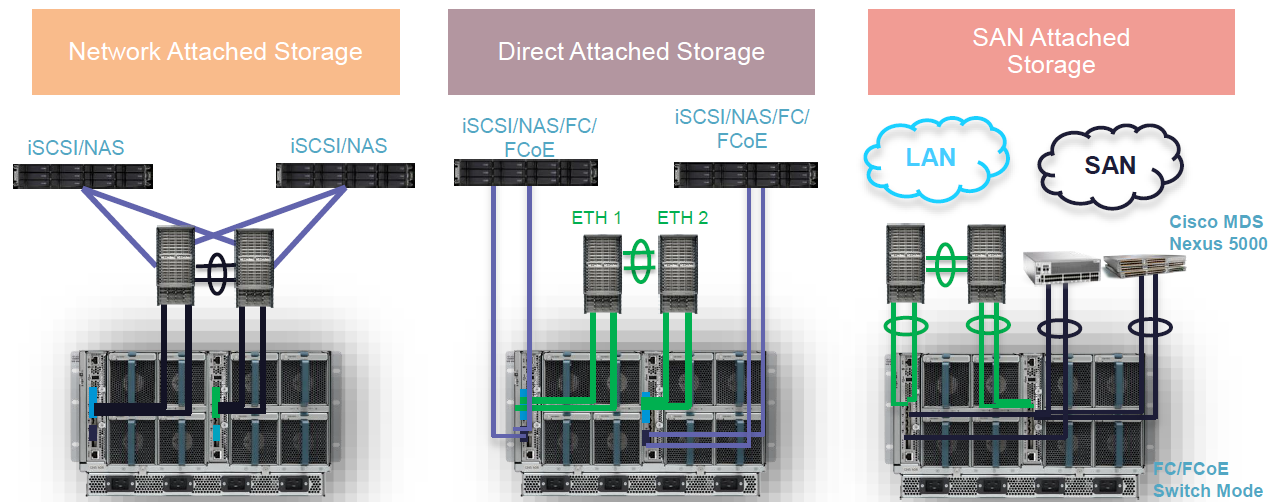
Storage Architectural Support


  • •FC switching mode only, no NPV mode for first release
  • •Both native FC/FCOE supported
  • •FCoEsupport both local attach and remote target (VF/VE)
    • –FC support both local attach and remote target (TF/TE)
    • –FCoEport-channel and FC san-port-channel supported
    • •VFC over ETH (uplink port/storage port only)
  • •VFC over VETH (blade vfcports)
  • •Uplink ports (1/1-4)can be fcoeuplink/fcoestorage/FC (switch mode)
  • •Scalability ports (1/5/1-4) can be fcoestorage only

Apr 7, 2015

Cisco - UCS Central - Overview

1. Overview

Cisco UCS ® Manager provides a single point of management for an entire Cisco Unified Computing System (Cisco UCS) domain of up to 160 servers and associated infrastructure. Cisco UCS Manager uses a policy-based approach to provision servers by applying a desired configuration to physical infrastructure. Using Cisco UCS service profiles, administrators can reproduce existing physical environments, including the I/O configuration, firmware, and settings. The configuration is applied quickly, accurately, and automatically, improving business agility. A role-based access control (RBAC) model helps ensure security of the system configurations.
Cisco UCS Central Software extends the simplicity and agility of managing a single Cisco UCS domain across multiple Cisco UCS domains. Cisco UCS Central Software allows companies to easily work on a global scale, putting computing capacity close to users while managing infrastructure with centrally defined policies. Cisco UCS Central Software makes it easy to help ensure global policy compliance, with subject-matter experts choosing the resource pools and policies that need to be enforced globally or managed locally. With a simple drag-and-drop operation, Cisco UCS service profiles can be moved between geographies to enable fast deployment of infrastructure, when and where it is needed, to support business workloads. Cisco UCS Central Software does not replace Cisco UCS Manager, which is the basic engine for managing a Cisco UCS domain. It builds on the capabilities provided by Cisco UCS Manager and requires it to be in place to effect changes in individual domains. 
 
2. Features and Benefits 
Centralized inventory
Manual inventory spreadsheets are no longer needed. Cisco UCS Central Software automatically aggregates a global inventory of all Cisco UCS components, organized by domain, with customizable refresh schedules. Cisco UCS Central Software provides even easier integration with ITIL processes, with direct access to the inventory through an XML interface. 


Centralized fault summary
Quickly and easily view the status of all Cisco UCS infrastructure with a quick-look global fault summary panel, a fault summary organized by domain and fault type, with views into individual Cisco UCS Manager domains for greater fault detail and more rapid problem resolution. Drilling down on a fault will bring up UCS Manager in context for a seamlessly integrated experience. 


Centralized, policy-based firmware upgrades
Take the guesswork and manual errors out of updating infrastructure firmware. You can download firmware updates automatically from the Cisco.com website to a firmware library within Cisco UCS Central Software. Then update firmware, globally or selectively, on an automated schedule or as your business workloads allow. Managing firmware centrally helps ensure compliance with IT standards and makes reprovisioning of resources a point-and-click operation.
Global ID pooling
Eliminate identifier conflicts and help ensure portability of software licenses with Cisco UCS Central Software. Centralize the sourcing of all IDs, such as universal user IDs (UUIDs), MAC addresses, IP addresses, and worldwide names (WWNs), from global pools and gain real-time ID use summaries. Centralizing server identifier information makes it simple to, for example, move a server identifier between Cisco UCS domains anywhere in the world and reboot an existing workload to run on the new server. 

Domain grouping and subgrouping
Simplify policy management by creating domain groups and subgroups. A domain group is an arbitrary grouping of Cisco UCS domains that can be used to group systems into geographical or organizational groups. Each domain group can have up to five levels of subdomains, which makes it easy to manage policy exceptions when administering large numbers of Cisco UCS domains. Each subdomain has a hierarchical relationship with the parent domain. 

Global administrative policies
Help ensure compliance and staff efficiency with global administrative policies. These policies are defined at the domain group level and can manage anything in the infrastructure, from date and time and user authentication to equipment power and system event log (SEL) policies. 

Global Cisco UCS service profiles and templates
Just like the Cisco UCS service profiles and templates that have made IT departments so much more effective, global Cisco UCS service profiles and templates enable fast and simplified infrastructure deployment and help ensure consistency of configurations throughout the enterprise. This feature enables global bare-metal workload mobility in much the same way as a hypervisor enables virtualized workload mobility. 

Statistics aggregation
Gain a better understanding of how Cisco UCS domains are functioning over time to improve operations to smoothly handle periodic peaks and shifts in workload. To accelerate the collection of statistics, the centralized database schema is open and data can be accessed directly or through the Cisco UCS Central Software GUI, command-line interface (CLI), or XML API.
XML API
Cisco UCS Central Software, just like Cisco UCS Manager, has a high-level industry-standard XML API for interfacing with existing management frameworks and orchestration tools. The XML API for Cisco UCS Central Software is similar to the XML API for Cisco UCS Manager, making integration with high-level managers very fast.
Backup
Cisco UCS Central Software has an automatic backup facility that enables quick and efficient backing up the configuration information of the registered Cisco UCS Managers and UCS Central. 

High availability
As with all Cisco UCS solutions, Cisco UCS Central Software is designed for no single point of failure. High availability for Cisco UCS Central Software allows organizations to run Cisco UCS Central Software using an active-standby model with a heartbeat that automatically fails over if the active Cisco UCS Central Software does not respond.
 
3. Arcitecture
Cisco UCS Central Software is a virtual appliance that is prepackaged as a VMware .ova or an ISO image. VMware and Microsoft hypervisors are supported. Typically deployed in an active-standby configuration, the product is hosted outside the managed Cisco UCS domains. Cisco UCS Central Software securely communicates with Cisco UCS Manager instances to:
  • Collect inventory and fault data from Cisco UCS Managers throughout the enterprise (Figure 1)
  • Create resource pools of servers available to be deployed within minutes
  • Enable role-based management of all resources
  • Support the creation of global policies, Cisco UCS service profiles, and templates
  • Enable the downloading of and selective or global application of firmware updates
  • Invoke individual Cisco UCS Manager GUIs in context for more detailed management


Jan 23, 2015

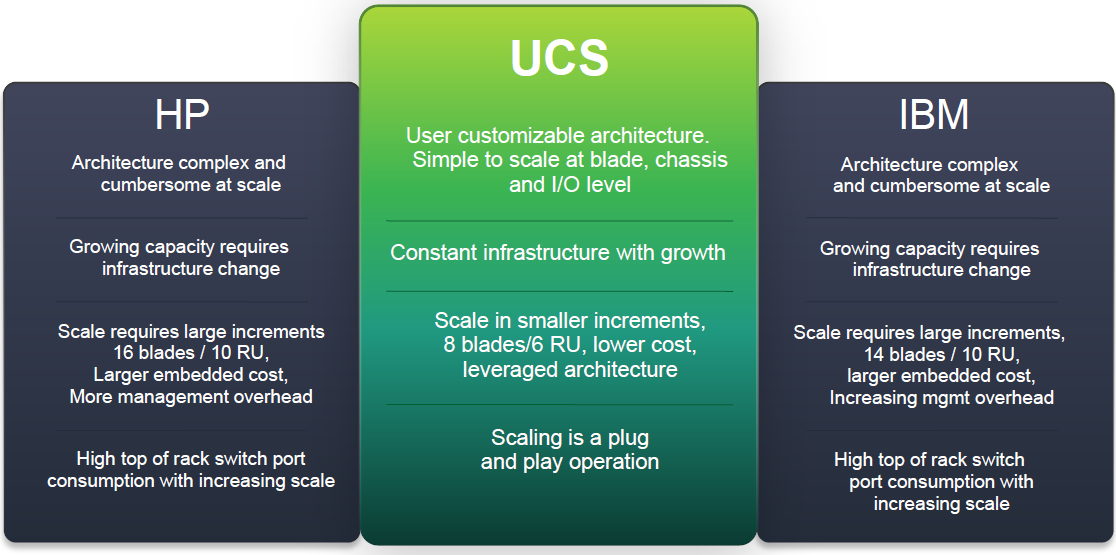
Cisco UCS vs Legacy vs HP vs IBM Blade

1. Cisco UCS vs Legacy


Architecture and Scale
Cisco UCS Architecture
Legacy Designs
Unified Compute
Scattered, De-centralized Compute
•Stateless Computing, abstracted identity
•Portable Identities - form factor agnostic, blade to rack server identity transfer
•Physical & virtual functionally combined
•No truly functional identity abstraction
•Blade and rack servers segregated, no identity portability between form factors
•Physical & virtual identities independent


I/O and Virtualization
Cisco UCS Architecture
Legacy Designs
Unified Fabric
Siloed and Complex
•Single port - LAN, SAN, Mgmt path
•Reduced complexity
•Physical & virtual port end to end visibility and control with a single tool
•Multiple I/O protocols & stranded capacity
•High port consumption, no design leverage
•Limited & separate physical & virtual port visibility, minimal control, multiple tools


Management
Cisco UCS Architecture
Legacy Designs
Unified Management
Complex Mgmt Structure
•Single mgmt tool, single interface
•Highly collaborative roles based control
•Mgmt interface leveraged across multiple servers and domains
•Multiple mgmt tools, multiple interfaces
•Every Administrator has multiple tools
•Duplicative mgmt points and access, complicated and inefficient with no scale


2. Blade Architecture and Scaling


3. IO and Virtualization


4. Management

5. Documents


Unified Computing System Market Traction

C- series Competitive Overview

Cisco UCS Architecture Comparison Technical Decision Maker

ucs_architecture_comparison_deck_business_decision_maker

Cisco UCS Compute Intra-Line & Side by Side Competitive Compares

Cisco UCS Architecture Comparison Technical Decision Maker

Cisco UCS Architecture Comparison Business Decision Maker

Cisco UCS Technical Decision Maker TCO Competitive Overview

Cisco UCS vs. IBM Flex System

UCS vs. HP Blade Chassis Pricing

Power Efficiency Comparison: Cisco UCS 5108 Blade Chassis and IBM Flex System Enterprise Chassis

Cisco UCS Architecture and Management: Comparison with IBM Flex System

UCS vs IBM Flex

Cisco UCS Outperforms IBM Flex System Blades

How to Differentiate UCS from HP BladeSystem

Cisco UCS Architecture Comparison - Best Rated