The Telecommunications industry is facing an ever-increasing set of threats brought on by new technologies, serving as a disintermediation between company and end customers, which consequently diminishes traditional profit margins and reduces Telco's ability to control their own business and share of wallet. Examples include Smart Phones milking revenues from applications and customer ownership preferences (i.e. Apple or Android platform, etc.). Social media sites, increased competition from other providers (IP providers, wifi, Wimax, etc.), and decreased customer acquisition are all challenges that Telcos are facing today
The Telecommunications industry is facing an ever-increasing set of threats brought on by new technologies, serving as a disintermediation between company and end customers, which consequently diminishes traditional profit margins and reduces Telco's ability to control their own business and share of wallet. Examples include Smart Phones milking revenues from applications and customer ownership preferences (i.e. Apple or Android platform, etc.). Social media sites, increased competition from other providers (IP providers, wifi, Wimax, etc.), and decreased customer acquisition are all challenges that Telcos are facing today:
Better 360˚ view of customer
More detailed customer profile
Improved accuracy and timeliness of data
Better ARPU, Share of Customer Wallet
Real-time Marketing
Quicker response to the market and government requests
Connect serial console of the master XSCF ( both XSCF is better )
Log in as user default. This can only be done when connected via a serial cable as described on previous page. Move the mode switch on the master XSCF as prompted, follow instructions
3. Create a new user account
Basic comamnds:
adduser
password
setprivileges
4. XSCF command line navigation tips
Press TAB show more
5. Verify hardware configuration
6. Config Autologout
setautologout
showautologout
.
7. Configure Networking for a single BB
Verify existing network routes
XSCF> showroute -a
XSCF> setroute -c del -n 0.0.0.0 -g <ip_of_gateway> xscf#0-lan#0
00:Powering on
*Note*
This command only issues the instruction to power-on.
The result of the instruction can be checked by the "showlogs power".
XSCF> poweron -a
PPAR-IDs to power on:00,01,02,03
Continue? [y|n]:y
00:Powering on
01:Powering on
02:Powering on
03:Powering on
*Note*
This command only issues the instruction to power-on.
The result of the instruction can be checked by the "showlogs power".
In SPARC M10 systems, processors, system interconnects, and the memory and I/O subsystems work in concert to create a scalable, high-performance platform ready to address a wide range of workloads, from consolidation of general purpose enterprise computing to the fastest, largest, and most secure database processing.
The design of the SPARC M10 systems focuses on high reliability, and places emphasis on maximizing the merits of memory locality in a ccNUMA architecture to deliver outstanding performance. The characteristics and capabilities of every subsystem within the SPARC M10 systems work toward this goal. A high-bandwidth system bus, powerful SPARC64TM X processors, dense memory support, and fast PCI Express combine within the SPARC M10 systems to deliver the highest levels of uptime and throughput, as well as dependable scaling for enterprise applications.
DDR3 DIMMs
PCI express generation3
High speed interconnection between CPUs (14.5Gbps)
The system interconnect underpins the highest levels of performance, scalability and reliability for the SPARC M10 systems. Multiple system controllers and crossbar units within the SPARC M10 systems provide point-to-point connections between CPU, memory, and I/O subsystems. Offering more than one bus route between components enhances performance and allows system operation to continue in the event of a fault. The system interconnect used in the SPARC M10 systems delivers as much as 6553 GB/second of peak bandwidth, offering nine times more system throughput than Fujitsu’s previous generation of high-end servers
2. Software on Chip
Database Accelerator Engine Decimal Arithmetic Logical Units embedded in processor
Supports decimal floating-point processing based on IEEE Standard(IEEE754) and Oracle Number
HPC-ACE SIMD(Single Instruction Multiple Data)
High speed arithmetic processing by four elements in a single instruction (Application of supercomputer technology)
Encryption/Decryption Engine
Supports cryptographic algorism: AES, DES, 3DES, RSA, and SHA
3. Liquid Loop Cooling
4. XSCF
Each building block and XB-BOX has a XSCF, that is not redundant in a single building block.
In a M10-4S system with 2 or more building blocks, XSCFs in the system form redundancy. System consists of one Master, one Stand-by and remaining Slave XSCFs.
Interconnection between Master, Stand-by and Slave XSCFs is called SSCP (SP to SP Communication Protocol)
Same revision of XCP is running on all the XSCFs, except intermediate status during firmware update
VBSC/LDC (communication between XSCF and domain, or domains)
No new protocol added on the top of VBSC/LDC. This is almost same as T-Series servers
Some enhancements for SPARC M10 are done by adding commands or parameters on top of BSC/LDC. Enhanced items are as follows:
PCIe Conf. notification
Log notification to inform license violation of CPU core activation
Reset/panic request to guest domain
SSCP (communication between XSCFs)
Protocol is usual TCP/IP, and is used to transfer all the information to be transferred between XSCFs
Default SSCP address is used when XSCF starts. Administrator can change address to different one by setsscp command
XSCF> poweron -p 0 -y
PPAR-IDs to power on:00
Continue? [y|n]:y
00:Powering on
*Note*
This command only issues the instruction to power-on.
The result of the instruction can be checked by the "showlogs power".
XSCF> poweron –a -y
PPAR-IDs to power on:00,01,02,03
Continue? [y|n]:y
00:Powering on
01:Powering on
02:Powering on
03:Powering on
*Note*
This command only issues the instruction to power-on.
The result of the instruction can be checked by the "showlogs power".
XSCF> console -p 0 -y
Console contents may be logged.
Connect to PPAR-ID 0?[y|n] :y
"#" and "." (period)
Useful Docs:
White Paper - SPARC M10 Server Architecture
1.Introduction
Fujitsu has developed the SPARC64TM X (ten) and the new SPARC64TM X+ (ten plus) processor to combine high performance and high reliability. The Fujitsu M10 systems which surround the SPARC64TM X/SPARC64TM X+ processor merge numerous hardware and software technologies to provide customers with the most appropriate solution for their ever-growing IT infrastructure.
With the SPARC64TM X/SPARC64TM X+ processor developed for UNIX servers, the peripheral ASIC functions have been consolidated into the processor. Many processing functions, which were traditionally handled by software, have been built in to the processor hardware by adding multiple, dedicated instructions; thus achieving significant improvement in processing speed (throughput) and overall performance.
SPARC64TM X/SPARC64TM X+ processors are connected together in Fujitsu M10 systems using a cutting-edge fast interconnect technology. Moreover, the Fujitsu M10-4S model adopts the Building Block method1 of expansion which can reduce customers’ initial investment and achieve linear performance as the system grows to meet increasing demand. Up to 16 Fujitsu M10-4S chassis can be interconnected to build a single, large system with up to 64 CPUs, delivering the highest performance in an extremely flexible and scalable system. These features make the Fujitsu M10 systems the most appropriate servers for datacenters in the cloud computing era.
Fujitsu M10 systems are offered with two kinds of processors, SPARC64TM X+ and SPARC64TM X. With these two processors customers are able to select the most appropriate engine depending on the work load required. Furthermore, the Fujitsu M10-4S server supports combined SPARC64TM X and SPARC64TM X+ chassis in a singlessystem, protecting previous IT investments.
Fujitsu M10 systems also benefit from improved power-saving features and increased ease of installation. Together SPARC64TM X/SPARC64TM X+ processors, with consolidated peripheral ASIC functions, and Fujitsu M10 systems, with high-efficiency power supplies and novel new cooling technology, lead directly to a very densely packaged server delivering substantial space savings and reduction in power usage.
2. SPARC M10-1 2.1 SPARC M10-1 Overview
Is a 1 RU rack-mounted server
Is designed to take full advantage of the exceptional power and performance of the SPARC64 X processor
Is a single-socket system with up to 16 cores
Is an eco-friendly server which reduces power consumption and noise, uses high efficiency power supply (80plus)
Has 16 memory slots up to 512 GB memory and 3x PCI Express 3.0 slots
Incorporates the sun4v kernel architecture that supports Oracle VM Server for SPARC 3.0
Supports Oracle Solaris 10 and Oracle Solaris 11
The SPARC M10-1 has the following key features:
Single socket, 2.8GHz,SPARC64 X processor which provides 16 cores with 2 SMT threads per core
Can be extended from a minimum of 2 cores to a maximum of 16 cores in stages by using CoD
As many as sixteen dual in-line memory modules, (DIMMs) can be extended up to 512 GB memory (with 16 x 32GB DDR3L DIMM).
For disk storage, up to eight hot-swap 2.5' SAS HDDs and SSDs
3 x8 lane PCIe slots (Gen3) in base system, extended up to 23 PCIe slot with PCI Expansion Units
The reliability features of the SPARC M10-1 include:
Redundant, hot-swappable fan modules
Redundant, hot-swappable AC power supplies
Hot-swappable HDDs/SSDs
Hardware RAID (RAID0, 1, 1E)
Automatic core failover to a reserved core by CoD
Predictive Failure Analysis - By monitoring fan speeds and DIMM error rates, components close to failure can be predicted.
Remote system management through an XSCF, eXtended System Controller Facility, unit which has its own serial, USB, and 1000BaseT Ethernet ports
Memory RAS features: Memory mirroring and Extended ECC
2.2 SPARC M10-1 Physical Characteristics
Front Visible Components
M10-1 Operation Panel
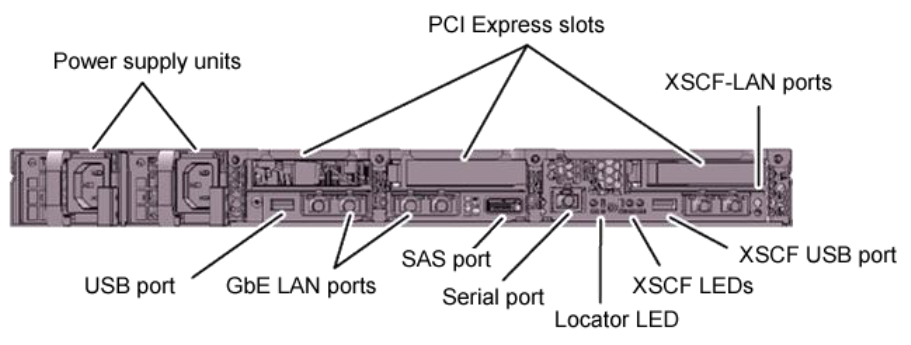
M10-1 Rear Visible Components
M10-1 Major System Components
3. SPARC M10-4
3.1 SPARC M10-4 Overview
Is a 4 RU rack-mounted server
Is designed to take full advantage of the exceptional power and performance of the SPARC64 X processor
Is the four-sockets system, scalable up to 64 cores
Is an eco-friendly server which reduces power consumption and noise, uses High efficiency power supply (80Plus)
Has 64 DIMM slots up to 2TB memory, 11x PCI Express 3.0 slots
Incorporates the sun4v kernel architecture that supports Oracle VM Server for SPARC 3.0
Supports Oracle Solaris 10 and Oracle Solaris 11
Key Features of the SPARC M10-4:
Four CPUs, 2.8GHz,SPARC64 X processor which provides 16 cores with 2 SMT threads per core
Can be extended from min. 4 cores to max. 64 cores in stages by using CoD
As many as 64 dual in-line memory modules, (DIMMs), up to 2TB (64x 32GB DDR3L DIMM)
For disk storage, up to eight hot-swap 2.5' SAS HDDs and SSDs
11 x8 lane PCIe slots (Gen3) in base system, extended up to 71 PCIe slot with PCI Expansion Units
Liquid Loop Cooling (LLC) Refrigerant transfers heat to cooling efficient locations in the server, where heat is dissipated through heat-sinks
Reliability Features of SPARC M10-4:
Redundant, hot-swappable fan modules
Redundant, hot-swappable AC power supplies
Hot-swappable HDDs/SSDs
Hardware RAID (RAID0, 1, 1E)
N+1 redundant cooling pump used for LLC
Automatic core failover to a reserved core by CoD
Predictive Failure Analysis - By monitoring fan speeds and DIMM error rates, components close to failure can be predicted.
Remote system management through an XSCF, eXtended System Controller Facility, unit which has its own serial, USB and 1000BaseT Ethernet ports
Memory RAS features: Memory mirroring and Extended ECC
3.2 SPARC M10-4 Physical Characteristics
M10-4 Front Visible
M10-4 Operation Panel
M10-4 Rear Visible Components
M10-4 Major System Components
4. SPARC M10-4S Building Block (BB) 4.1 SPARC M10-4S Building Block (BB) Overview
Is a 4 RU rack-mounted server known as a Building Block (BB)
Is designed to take full advantage of the exceptional power and performance of the SPARC64 X processor
Is the four-sockets system, scalable up to 64 cores
Is an eco-friendly server which reduces power consumption and noise, uses High efficiency power supply (80Plus)
Has 64 DIMM slots up to 2TB memory, 8x PCI Express 3.0 slots
Incorporates the sun4v kernel architecture that supports Oracle VM Server for SPARC 3.0
Supports Oracle Solaris 10 and Oracle Solaris 11
The SPARC M10-4S has the following key features
Four CPUs, 3.0GHz, SPARC64 X processor which provides 16 cores with 2 SMT threads per core
Each BB Can be extended from min. 4 cores to max. 64 cores in stages by using CoD
Each BB has many as 64 dual in-line memory modules, (DIMMs) , up to 2TB (64x 32GB DDR3L DIMM)
Each BB supports up to eight hot-swap 2.5' SAS HDDs and SSDs
8 x8 lane PCIe slots(Gen3) in BB, extended with PCI Expansion Units
Liquid Loop Cooling (LLC) Refrigerant transfers heat to cooling efficient locations in the server, where heat is dissipated through heat-sinks
The reliability features of the SPARC M10-4S include:
Redundant, hot-swappable fan modules
Redundant, hot-swappable AC power supplies
Hot-swappable HDDs/SSDs
Hardware RAID (RAID0, 1, 1E)
N+1 redundant cooling pump used for LLC
Automatic core failover to a reserved core by CoD
Predictive Failure Analysis - By monitoring fan speeds and DIMM error rates, components close to failure can be predicted.
Remote system management through an XSCF, eXtended System Controller Facility, unit which has its own serial, USB and 1000BaseT Ethernet ports
Memory RAS features: Memory mirroring and Extended ECC